1 / 5
New
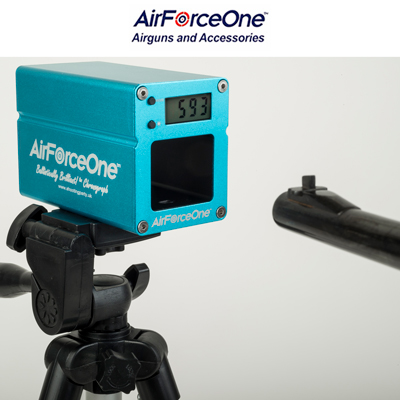
AirForceOne Ballistically Brilliant Chronograph
Gun parts and accessories · Chronographs
£149.99
718 people have viewed this item
Overview
AirForceOne Ballistically Brilliant Chronograph
PORTABLE VELOCITY AND POWER METER FOR SHOOTERS
The AirForceOne Ballistically Brilliant Chronograph does so much more than your average chronograph! This portable power measurement meter is small, light and fully-portable as it is powered by rechargeable battery. It reads velocity and muzzle energy in either imperial or metric, and can be linked to a personal computer with the included cables. It can also be tripod mounted and used further down range if required. Additionally, the AirForceOne Ballistically Brilliant Chronograph will also record temperature and humidity, and record rapid-fire shots.
Why a chronograph is important
A âchronoâ, like the AirForceOne Ballistically Brilliant Chronograph, is an essential piece of kit for all shooters, but especially airgunners. A chrono will give you the power output (and velocity) of your projectile, which is useful when assessing different types of ammunition.
But for airgunners in the UK, it is especially important to ensure compliance with the strict shooting laws. Air rifles must not exceed 12ft/lbs muzzle energy, otherwise you require a Section One firearms certificate (FAC). For air pistols, the law is even stricter, because handgun ownership has been outlawed in the UK since 1997. So, and air pistol must not exceed 6ft/lbs (and it is a very serious offence if it does!).
PRODUCT FEATURES
Fully portable, re-chargeable battery powered.
Indoor & Outdoor use
No auxiliary light-source required
Easy carry -Handy and Lightweight design.
Measure Pellet velocity and Rate of Fire
Calculate Muzzle Energy in Foot/lbs (FPE) or Joules
Download all your test data to your computer.
Record Temperature and humidity at the time of the shot
Charging & Data Cables included
Clear, back-lit display
Screw-cut for tripod mounting
Testing Accuracy: <+ 1.3%
INSTRUCTIONS
For software please download Instructions for use of FPE1.38 software.
Quick Guide
thank you for using our Ballistically Brilliant! tm Chronograph. Please make sure you read this quick guide carefully before you use the chrono. Please also watch Mike Duffyâs âHow to Useâ video:-
Testing Speed: 0-50 Pellets per second
Muzzle Velocity Measurement: 49 feet -2789 feet per second
Testing Accuracy: <+ 1.3%
Voltage: DC 3.7-4.2V
Temperature & Humidity Testing Function
Temperature: 0-50c Humidity: 20%-95%
Size: 105 x 57 x 70mm Weight: 230g
INSTRUCTIONS FOR USE
1.Charging the Chronograph Battery
Before use, charge the Chronoâs battery using the USB power cable provided (The battery indicator light will glow red). Connect the USB connector to a USB enabled 3-pin AC plug, or any suitable USB adapter such as a mobile phone charger or on a computer, printer or similar device. When the Battery is low the display will show âLOâ. When the battery is fully charged the battery indicator light will glow green.
Power âOn/Offâ
The âOn/Offâ switch is located on the rear of the unit.
Screen Back Lighting/Test data download
In dark conditions, press the * button on the front of the unit and the screen will be back-lit. Press again to switch the back-light off. To download test results data to your PC or laptop, select the time display by using the âmodeâ button on the front of the unit, then press the * button. Your data will download via the USB data cable to your connected PC or Laptop.
Adjusting the time
With the time displayed, press and hold down the * button, then press the âmodeâ button; release the * button and then press âmodeâ repeatedly until the correct hour is selected. Press * to confirm, then repeat the procedure to adjust the minutes,
Measuring Temperature & Humidity
With the Display in âTimeâ mode, press the mode button briefly and then you can tab between temperature readings in Celsius and Fahrenheit and Humidity
Muzzle Velocity & Firing Speed Measurement
With the display in âTimeâ mode, press and hold the mode button the Chronoscope will then enter Muzzle Velocity measuring mode and the display will show: â â â â You can now fire your gun from a distance of 6â inches (15cm) through the aperture at the front of the device to measure the pellets velocity in âFeet per Secondâ (FPS). To measure your rate of fire, press the mode button briefly again whilst in velocity measuring mode and the display will show a rate of fire in the format : 0. To return to velocity, press the mode button again. In either mode if the display shows â1Eâ or â2Eâ there was an error, the shot needs to be taken again.
WARNING Always ensure that you have a safe firing zone behind the Chronoscope and a backstop to absorb pellets safely. Be careful to avoid hitting the body of the device, or the display screen when firing.
Test Data playback
In the muzzle velocity mode, press the * button and you can display the last 50 groups of test data.
Data Download to your Computer.
By using the supplied Data Cable (Micro USB to USB) you can download real-time test data to your laptop or PC. Download the dedicated application from: âhttp://taiwan-airgun.com/en/news_detail.php?NNo=30
and you can calculate the kinetic energy (Muzzle Energy) in Foot/lbs (FPE) or Joules whilst showing details of the test environment, such as time of day, temperature, humidity and other useful data. NB. The program needs to run with administrator privileges (right click the .exe file to âRun as Administratorâ).
If you want a quick method of calculating muzzle energy, without having to download the above software, enter your pellet weight and the displayed velocity on your Chronograph , by following this link:-
http://extorian.co.uk/shooting/pellets.html
Specification
MakeAirForceOne
ModelBallistically Brilliant Chronograph
Features
New5 photos

